The Flow Docs with Electronic Signatures
A tour of what is new in Flow Docs: spreadsheets beside your documents, clean Word import, library-wide analytics, and the coming compliance cycle of legally sound electronic signatures, campaigns, and a self-renewing archive.

Flow Docs is where your documents already live: the policies, agreements, onboarding packets, spreadsheets, and certifications your team writes and shares every day. Over the last few releases we have been making it a place where that work actually gets done, not just stored. You can now build spreadsheets alongside your documents, bring existing Word files in cleanly, and see how your whole library is performing at a glance. And the next version goes further still, letting you collect legally sound electronic signatures on any document, at any scale, without ever leaving the platform.
Here is a tour of what is new, and where it is heading.
Spreadsheets, right where your documents are
Not everything is a paragraph. Rate cards, interpreter rosters, monthly billing, coverage grids: a lot of compliance and operations work is really a table with a little math on top. So Flow Docs now has real spreadsheets. A spreadsheet is just another page in your library, so it is searched, versioned, exported, and permissioned exactly like the rest of your content, and it opens into a familiar grid with formulas, multiple tabs, sorting, and cell formatting.
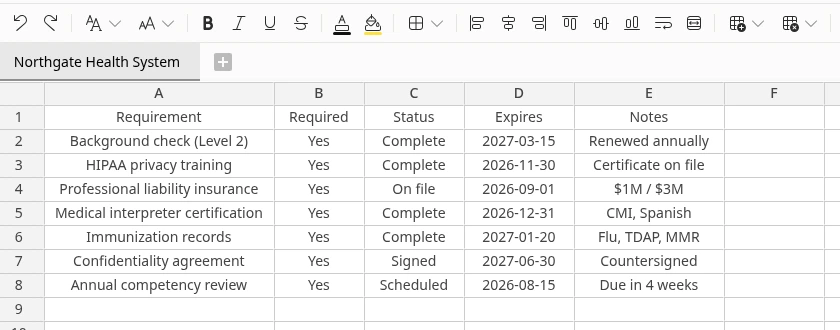
Because a spreadsheet lives beside the documents it relates to, the numbers stop drifting off into a file on someone's desktop. The billing sheet sits in the same book as the contract it bills against, and everyone who should see it, does.
Bring your existing Word documents in, cleanly
You already have the documents: contracts, policies, and templates written in Word over the years. Flow Docs imports them directly. Open the editor, choose Import, and pick a Word, RTF, HTML, or text file. The platform converts it into a clean, editable page, keeping the structure that matters: headings, bold and underline, tables, and numbered legal clauses that stay correctly numbered. No copy and paste, no reformatting from scratch.
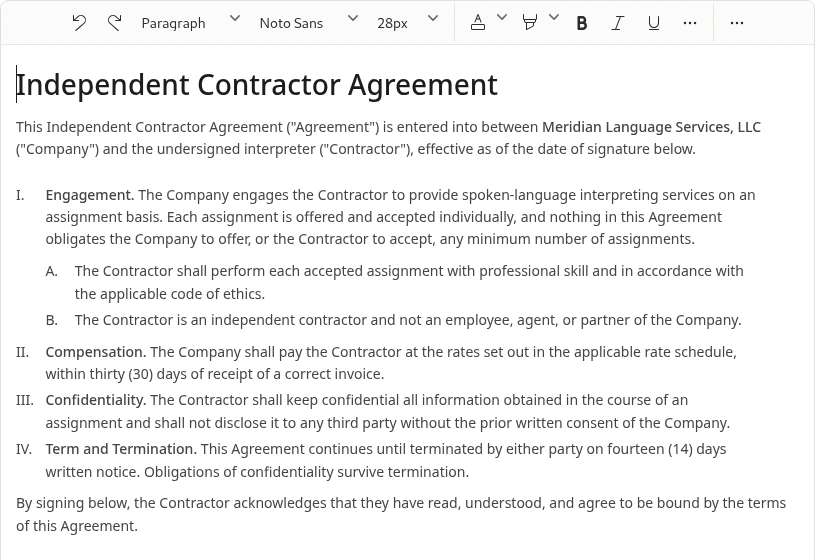
It is the fastest way to move a shelf full of existing paperwork into one place, ready to be personalized, signed, and tracked.
See how your whole library is doing
When your documents live in one place, you can finally measure them in one place. The statistics dashboard gives you an instant read on the whole library: how much content you have, how it has grown over time, what is being read, and where the gaps are, across engagement, content health, people, and taxonomy. It is the view for the person who has to answer "is this library healthy, and is it being used."
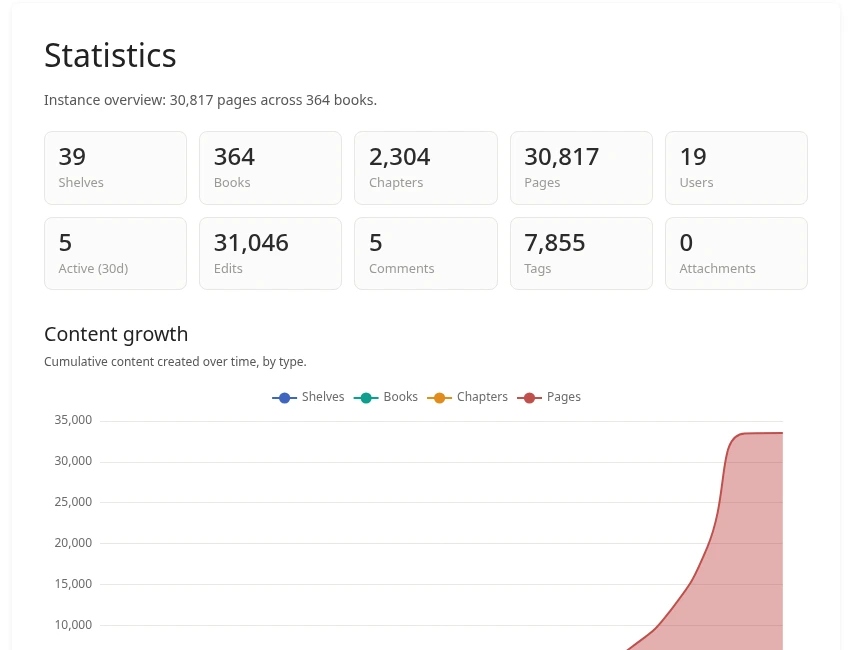
The same instinct runs through the newer compliance features below: every campaign carries its own analytics, so you are never guessing where a batch of signatures stands.
That work surface, documents, spreadsheets, and a clear view of it all, is the foundation. The next version of Flow Docs builds the full compliance cycle on top of it: you author the document, personalize it for every person, collect legally sound electronic signatures at any scale, and keep the signed results in a living library that tracks its own renewals. From template to signed archive, one platform.
Electronic signatures, built for evidence
A signature is only as good as the proof behind it. When someone signs a document in Flow Docs, the platform records the things that give an electronic signature its legal weight: who signed, when, from what device, and exactly what they agreed to, including the precise consent statement they checked. This follows the same legal model used by the leading e-signature services, recognized in the US under the ESIGN Act and UETA and in Europe under eIDAS.
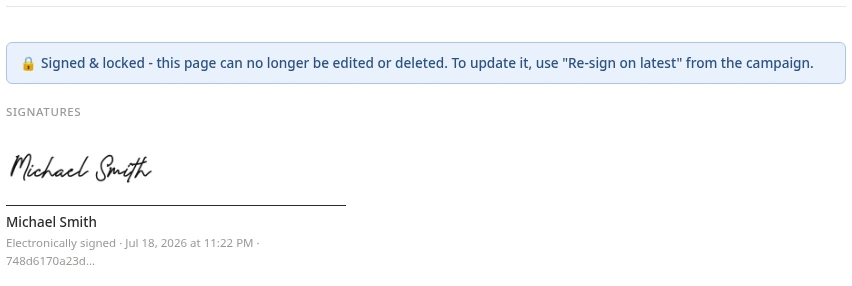
The part we are most proud of is what we call the freeze. A regular document can be edited at any time, and a signature on something that can quietly change afterward is worthless. So the moment a signature is requested, the platform pins the exact version of the document and takes its digital fingerprint. The signer sees precisely that version, and the fingerprint is stored with the signature forever. If anyone edits the document later, the record clearly shows the content changed after signing. What was signed stays provable, permanently, even if the document itself is deleted later: the evidence is preserved separately.
Signing itself is friendly. The signer can draw their signature, type it (shown in a handwriting style), or upload an image of it. Signers can be your own team members, or external people invited by email: they receive a secure one-time link, open the document, and sign, no account and no login required. Links expire on their own after fourteen days. A document can also require multiple signers, either everyone at once or in a set order, for example the candidate first, then the compliance officer.
Signed documents show their signatures right on the page, in PDF exports, and in print. You can place the signature block exactly where the document calls for it, or let the platform append a signatures panel automatically. And for the audit file, every completed signing produces a downloadable Certificate of Completion: the document and its location, the exact version fingerprint, each signer's name and email, how and when they signed, the address they signed from, their signature image, and the consent statement they agreed to.
Campaigns: one document, hundreds of signatures
Signatures solve one document at a time. Campaigns solve the yearly reality: a new policy acknowledgment, an updated independent contractor agreement, an onboarding packet, each needing signatures from dozens or hundreds of people.
A campaign starts from a template: an ordinary Flow Docs document with fill-in fields dropped wherever personal details belong. You insert a field from a menu, and it sits in the document as a tidy, movable placeholder, not raw code. Standard fields cover names, email, phone, company, job title, the full address, and the date, and you can define your own custom fields for anything else your documents need.
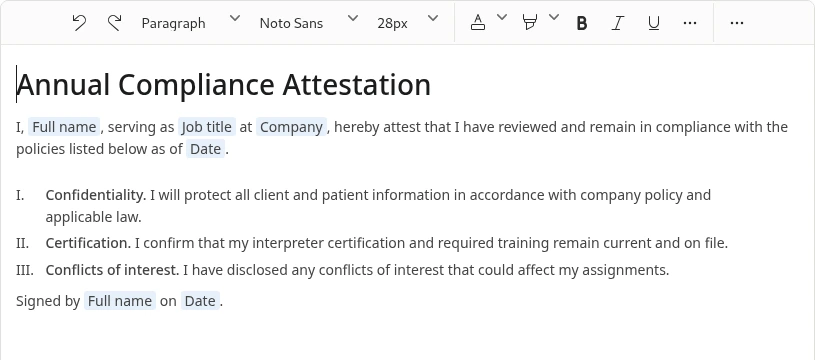
Then you bring in your recipient list: upload a spreadsheet file or paste rows straight from one, match the columns to the fields once, and the platform checks the list, points out bad email addresses, and merges duplicates so a list of two hundred rows means two hundred real people. A single campaign can handle thousands of recipients.
Before anything is created or sent, a preview shows the plan: who is ready, and who is missing required details. Nothing goes out until you review the generated documents and explicitly send, and sending is safe to repeat, a document that is already out for signature is never emailed twice. Each person then receives their own personalized copy to sign, generated from the template with their details filled in.
Missing someone's details? They fill them in themselves
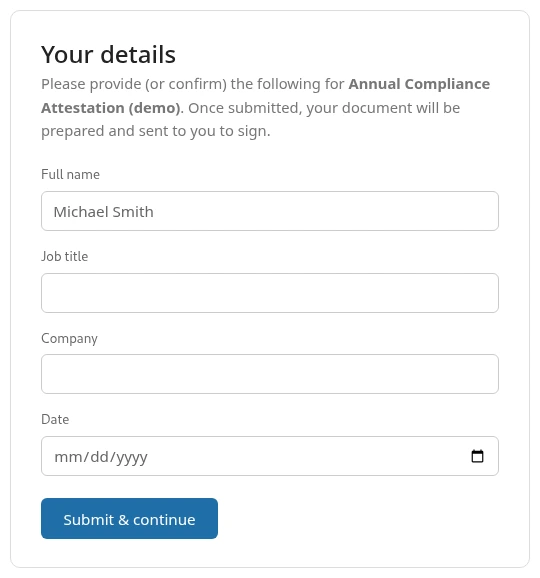
Recruitment lists are never complete, and chasing missing information is half the job. So campaigns close that loop on their own. A recipient whose details are incomplete gets a secure personal link to a short form asking only for what is missing. The moment they submit it, their personalized document is generated and moves straight into signing. People whose details were already complete skip that step entirely. No side emails, no retyping someone's answers into a spreadsheet.
Watch the whole campaign move
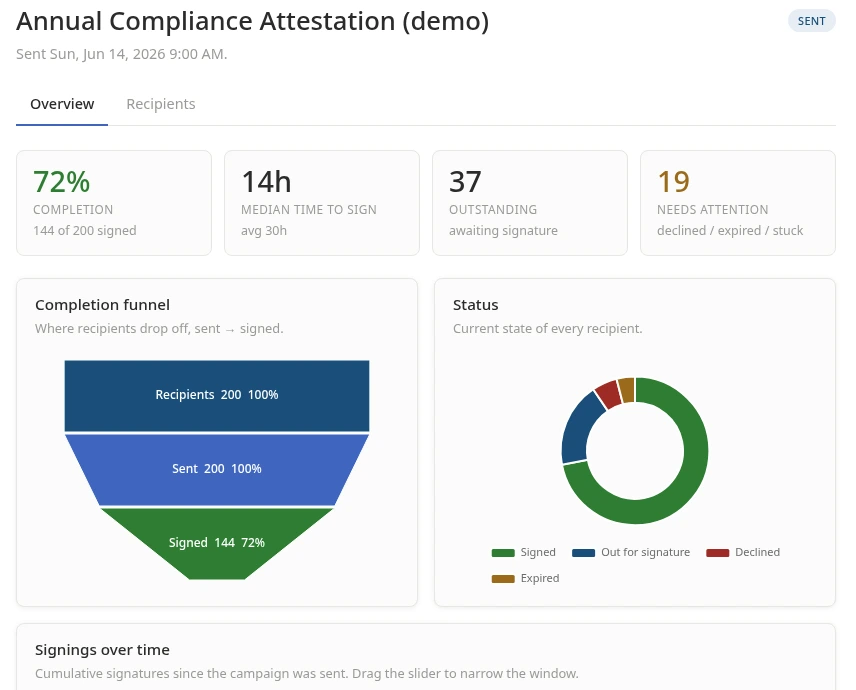
Every campaign carries a live roster: for each person, whether they are awaiting details, generated, sent, signed, declined, expired, or withdrawn, each with its timestamp. On top of that sits an analytics view built for the person who has to answer "where are we": the completion funnel, the status breakdown, how long people take to sign (from under three hours to more than ten days), signings over time, and an aging view of who has been sitting on an unsigned document the longest, so your reminders go exactly where they are needed. If a document has to be updated mid-campaign, you can re-send a new version, and the old copy is superseded rather than double-counted.
A library that keeps itself current
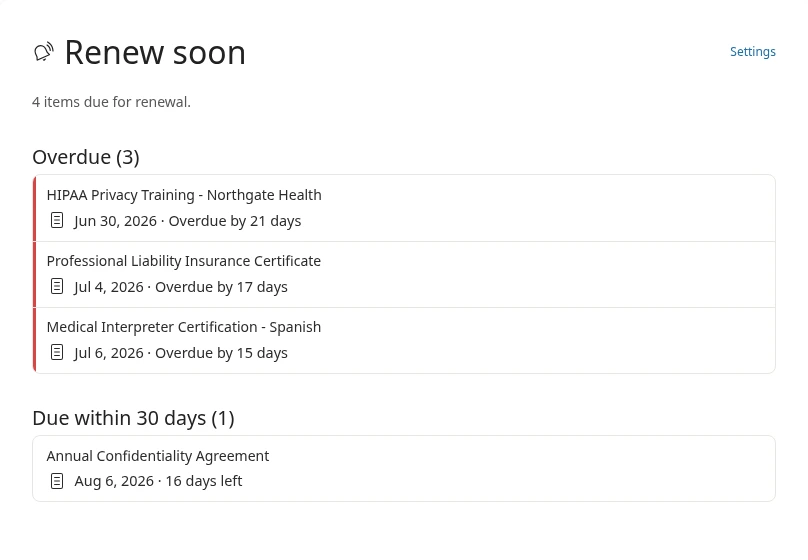
Signed documents do not scatter: every campaign files its results back into Flow Docs automatically, one section per template, one signed document per person. That library is alive. Any document can carry a renewal date with its own warning window, from five to ninety days ahead, and a "Renew soon" counter with an urgency dashboard (overdue first, then what is due within 5, 10, 15, 30, 60, and 90 days) makes sure certifications, agreements, and policies never expire silently. Documents can also be routed through review and approval, so a policy is signed off by the right person before it ever goes out for signatures.
What this means for your team
Compliance and recruitment teams will no longer need a separate document tool, a spreadsheet app, a third-party e-signature platform, and a reminder system stitched together by hand. Authoring, spreadsheets, importing, signing, proving what was signed, filing the results, and renewing them on schedule all happen in Flow Docs, with one login, one audit trail, and one place to look.
The team is finishing and testing the signature and campaign features now, and we will announce availability here on the blog.